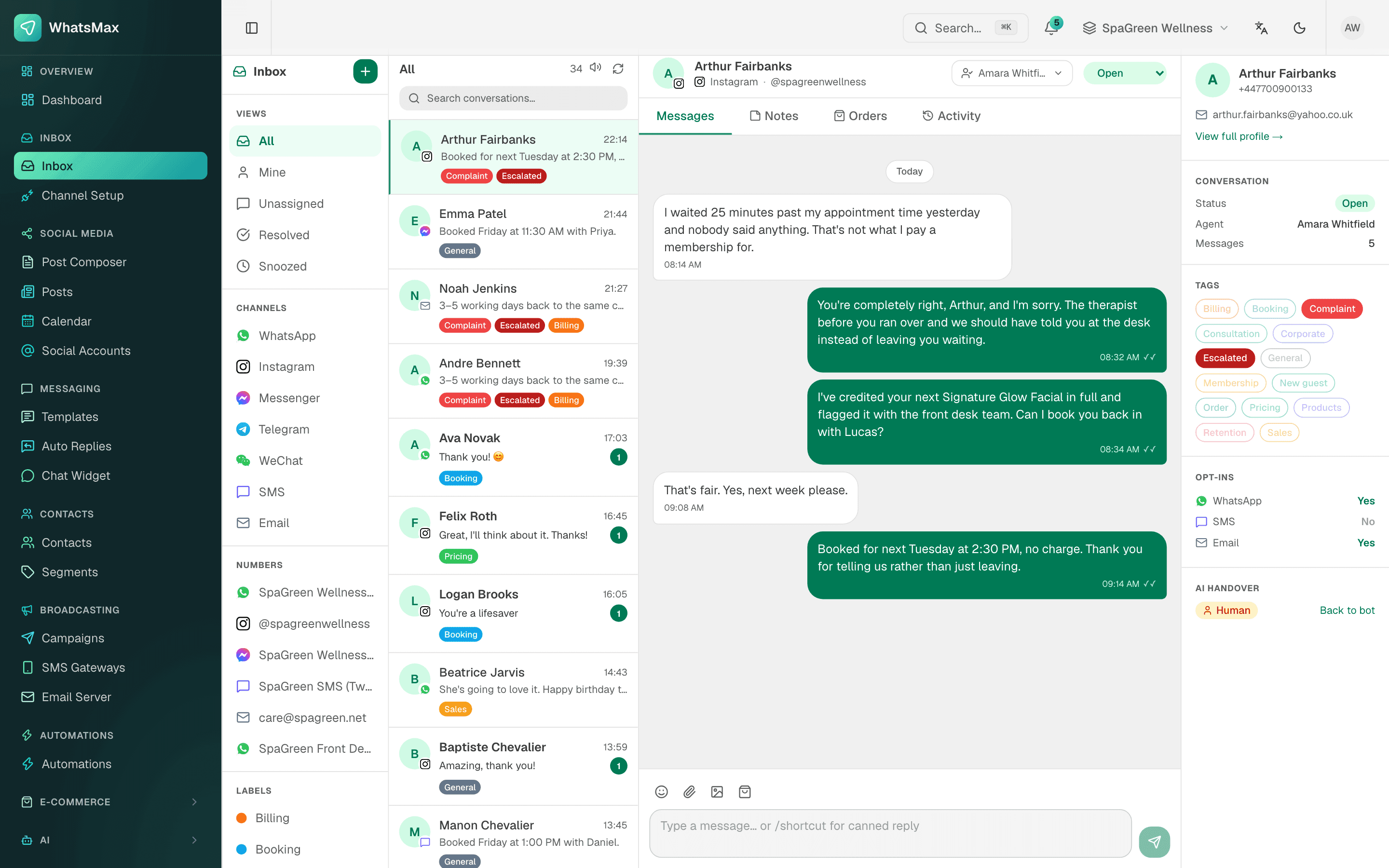
A typical Bangladeshi online business answers customers in three or four apps at once: the WhatsApp Business app on one phone, Messenger on the page admin's laptop, Instagram on someone else's mobile. Nobody knows who replied to whom, the same customer gets two different prices, and when the person holding the phone is off, the chats wait.
A shared inbox puts every conversation in one place that the whole team can see.
What is in the SaleMag shared inbox?
One thread list with all your messaging channels:
| Channel | How it connects |
|---|---|
| WhatsApp (official) | WhatsApp Business API, Cloud API |
| WhatsApp (QR) | Scan a QR code; unofficial, with a ban risk |
| Facebook Messenger | Connect your Facebook Page |
| Direct messages of your Instagram business account | |
| Telegram | A bot token from BotFather; groups supported |
| Official Account |
New messages, delivery ticks, assignments and typing indicators appear live, with notification sounds.
How does a team work from one inbox?
- Folders: Mine, Unassigned, All open, Snoozed and Resolved.
- Assignment: give a conversation to one teammate. They get a notification. Agents with the agent role see only their own and unassigned chats.
- Statuses: open, pending, snoozed and resolved.
- Labels: coloured tags such as "COD pending" or "Complaint", and you can filter the inbox by label, channel or account.
- Internal notes: private notes on the thread; @mention a teammate to notify them.
- Activity log: who assigned, changed status, labelled or handed over, and when.
What can agents send from the composer?
- Canned replies: type
/and a shortcut to drop in a saved answer, such as your delivery charge or return policy. - Attachments: images, video, audio, PDF and Office files up to 20 MB.
- Products: share an item from your connected store.
- Emoji and reactions: reactions work on WhatsApp and Telegram.
- Templates: on official WhatsApp numbers, the composer shows whether the 24-hour window is open, and opens the template picker when it is closed.
How does the inbox work with the AI chatbot?
Assign an AI chatbot to a channel account and it answers new messages. Those chats carry an AI badge. When the bot hands a chat over, because it is unsure or the customer asks for a person, the conversation switches to human, your team is notified, and the bot stops replying in that chat. An agent can switch the chat back to the bot with one click.
If you take orders by chat, the bot also stays quiet for 15 minutes after any teammate replies, so a person and the AI never answer at the same moment.
How do I know if the team is fast enough?
The inbox report shows:
| Metric | What it tells you |
|---|---|
| Median first response | How long customers wait for the first reply |
| Median resolution | How long a conversation takes to close |
| Opened vs resolved | Whether the backlog is growing |
| Channel mix | Where your chats come from |
| Agent leaderboard | Workload and speed per teammate, exportable to CSV |
What roles can I give my team?
Workspace roles are administrator, manager, editor, moderator, agent and viewer, so a new hire can answer chats without seeing billing or settings.
Who is the shared inbox for?
- F-commerce shops with two or more people answering chats
- Brands running ads to WhatsApp and Messenger that need fast first replies
- Businesses that want the AI to handle routine questions and people to handle the rest
See pricing or create an account to connect your first channel.
Frequently asked questions
Which channels come into the SaleMag inbox?
WhatsApp through the official Business API, WhatsApp numbers linked by QR code, Facebook Messenger, Instagram direct messages, Telegram bots and WeChat Official Accounts.
Can several people answer from one WhatsApp number?
Yes. Every teammate works from the same inbox, and you can assign each conversation to one person so two people do not reply at once.
Can I reply to a customer after 24 hours on WhatsApp?
On the official WhatsApp Business API, outside the 24-hour customer service window you send an approved message template. The composer shows the window status and opens the template picker.
Does the inbox work with the AI chatbot?
Yes. Chats the AI is answering show an AI badge. When the bot hands over, the chat moves to your team, and an agent can hand it back to the bot at any time.
Is there a mobile app?
SaleMag has a mobile agent API for conversations, replies, assignment and notes, but this page covers the web inbox. Ask us on the contact page about mobile access.
Are Instagram or Facebook comments in the inbox?
No. The inbox handles direct messages. Comments on posts are not pulled in.
Is WhatsApp QR as safe as the official API?
No. QR linking uses an unofficial connection and carries a risk of the number being banned. For broadcasts, templates and the in-WhatsApp order form, use the official API.
About the author
WhatsApp & F-commerce automation, Dhaka
The Dhaka team that builds SaleMag, the AI sales inbox for WhatsApp, Messenger and Instagram used by online sellers in Bangladesh.