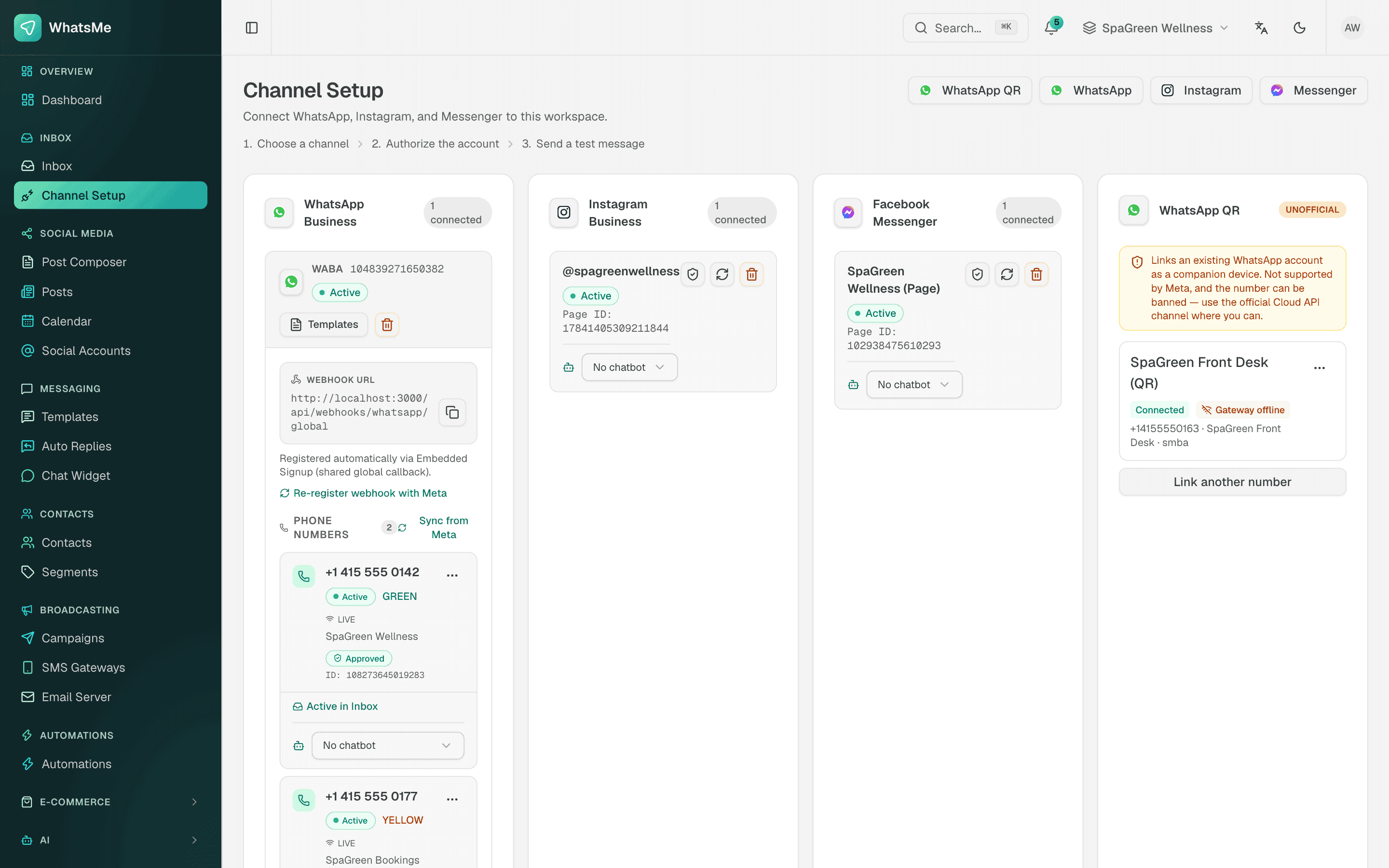
Most Bangladeshi shops start on the free WhatsApp Business app. It works until two people need to answer the same number, or an Eid sale brings in more chats than one phone can handle. The WhatsApp Business API is how a business moves past that: SaleMag connects your number to Meta's official WhatsApp Cloud API and puts every chat into one team inbox.
What is the WhatsApp Business API?
The WhatsApp Business API is Meta's official interface that lets a business send and receive WhatsApp messages through software instead of a phone app, so a whole team can work one number. Your number lives in a WhatsApp Business Account (WABA) under your Meta business. Messages arrive at SaleMag through Meta's webhooks, and your team replies from a browser.
WhatsApp Business app vs API: which one does my business need?
A business needs the WhatsApp Business API once more than one person answers the number, or once it wants automation, broadcasts and AI replies. The free app suits one person handling a few chats a day. The table compares the two:
| WhatsApp Business app | WhatsApp Business API (with SaleMag) | |
|---|---|---|
| Where you reply | A phone app | A shared web inbox for the whole team |
| Team | One person at a time | Many agents, with assignment and notes |
| Automation | Simple greeting and away messages | Keyword, welcome and away rules, plus an AI chatbot |
| Messages to old chats | Free-form | Approved templates outside the 24-hour window |
| Broadcasts | Small lists | Template campaigns to opted-in contacts |
| Order taking | Manual | AI builds the order and sends an order form |
If you have a team, run Facebook ads that send people to WhatsApp, or take dozens of COD orders a day, the API is the better fit.
How do I connect my number to the WhatsApp Business API in Bangladesh?
SaleMag connects a number through Meta's embedded signup in a few steps, with no developer needed:
- Open Channel Setup and choose WhatsApp.
- Log in with Facebook and choose or create your business and WhatsApp Business Account.
- Add and verify your phone number.
- SaleMag subscribes to the account's webhooks, registers the number and syncs your existing templates.
Your team then answers from the shared inbox. SaleMag also supports coexistence with the WhatsApp Business app, so an eligible number can stay on the app while it is connected; Meta's signup flow explains the current rules for a number that is already in use.
What is the WhatsApp 24-hour window?
The 24-hour window is Meta's rule that a business can send any free-form text, photo or file for 24 hours after the customer's last message. SaleMag checks the window for you: once it has closed, the inbox asks you to send an approved template instead of a free-form reply.
What are WhatsApp message templates?
A message template is a pre-written WhatsApp message that Meta approves before a business can send it outside the 24-hour window. Each template has a category, shown here with typical shop uses:
| Category | Typical use for a shop |
|---|---|
| Marketing | Eid offers, 11.11 sale announcements, new arrivals |
| Utility | Order updates, delivery reminders |
| Authentication | One-time codes |
In SaleMag you draft a template, submit it, and the status (pending, approved, rejected or paused) updates from Meta automatically. Approved templates can be used in replies, auto-replies and broadcast campaigns. Campaigns go only to contacts who have opted in to WhatsApp.
How do WhatsApp auto-replies work in SaleMag?
SaleMag's WhatsApp auto-replies are rules that answer the moment a message arrives, based on a keyword, the start of a new conversation or your business hours. The table shows when each rule type fires:
| Trigger | When it fires |
|---|---|
| Keyword | The message matches your words exactly, contains them, or matches a pattern |
| Welcome | The first message of a new conversation |
| Away / out of hours | Outside the schedule you set, for example after 10 pm |
A rule can reply with text, a photo or file, an approved template, or a WhatsApp Flow form. Rules run in priority order, and a matching keyword rule answers before the AI chatbot.
Can an AI chatbot answer WhatsApp messages?
Yes. SaleMag's AI chatbot answers WhatsApp questions from your knowledge base (product lists, files, web pages and FAQs) in the customer's language, including Bangla and Banglish. It states prices only from your data. When it cannot answer, or the customer asks for a person, it hands the chat to your team and notifies them.
With AI order taking switched on, the chatbot builds the cart and sends an in-WhatsApp order form, a WhatsApp Flow where the customer picks Inside or Outside Dhaka, enters name, phone and address, and taps Place order. You get a numbered cash-on-delivery order.
How much does the WhatsApp Business API cost in Bangladesh?
The WhatsApp Business API has two costs for a Bangladeshi business: Meta's per-message charge and the SaleMag plan. Meta's rate depends on the template category and the recipient's country, and Meta changes its rates over time, so check Meta's current rate card before you plan a big campaign. SaleMag's own plans are on the pricing page.
Get started
Connect your number, sync your templates and set one welcome rule. Then link an AI chatbot for your top products. Create an account to try it.
Step by step
- 1
Open Channel Setup
In SaleMag, go to Channel Setup and choose WhatsApp.
- 2
Complete embedded signup
Log in with Facebook, pick or create your Meta business and WhatsApp Business Account, and add your phone number.
- 3
Check templates
SaleMag syncs your existing templates. Draft new ones and submit them to Meta for approval.
- 4
Turn on replies
Add auto-replies or link an AI chatbot to the number, then send a test message.
Frequently asked questions
Is SaleMag's WhatsApp connection official?
Yes. SaleMag connects business numbers through Meta's official WhatsApp Cloud API using Meta's embedded signup.
What is the difference between the WhatsApp Business app and the WhatsApp Business API?
The WhatsApp Business app runs on one phone for one person at a time. The WhatsApp Business API has no phone app: messages reach software such as SaleMag, so a whole team can reply from a shared inbox and automations and an AI chatbot can run.
Do I need a developer to set up the WhatsApp Business API with SaleMag?
No. SaleMag uses Meta's embedded signup: you log in with Facebook, choose your business and WhatsApp Business Account, and add your number. SaleMag then registers the number and syncs your templates.
Can I keep using the WhatsApp Business app after connecting my number to SaleMag?
Yes, where Meta allows it. SaleMag supports coexistence, so an eligible number can stay on the WhatsApp Business app while connected to the Cloud API; Meta's signup flow shows the current eligibility rules. When someone replies from the app, SaleMag's AI chatbot stays quiet in that chat for 15 minutes.
Do I need Meta business verification to start using the WhatsApp Business API?
Usually not to start. Meta may ask a business to complete Meta business verification before it gets higher messaging limits or other features, and Meta, not SaleMag, sets those rules.
How much does the WhatsApp Business API cost in Bangladesh?
Two costs apply: Meta charges per message, with rates that depend on the template category and the customer's country and that change over time, and SaleMag charges for its plan. See pricing for SaleMag plans.
Can I message a WhatsApp customer who wrote to me last week?
Yes, with a Meta-approved message template. Free-form WhatsApp messages are only allowed within 24 hours of the customer's last message.
Can the AI chatbot reply on WhatsApp in Bangla, and does it make up prices?
Yes, SaleMag's AI chatbot replies in the customer's language, including Bangla and Banglish. No, it does not make up prices: it is instructed to state prices only from your product data and hands the chat to your team when it cannot answer.
About the author
WhatsApp & F-commerce automation, Dhaka
The Dhaka team that builds SaleMag, the AI sales inbox for WhatsApp, Messenger and Instagram used by online sellers in Bangladesh.