"Price koto?" "Delivery charge?" "Dhakar baire jabe?" "Size ache?" A Facebook page or WhatsApp number in Bangladesh gets these questions all day and half the night. Someone has to sit with the phone. When nobody answers fast, the customer buys from the page that replied first.
With an AI agent, those questions get an answer in seconds, from your own price list and policies. Your team only handles the chats that need a person: complaints, bulk orders and anything the AI is not sure about.
What is an AI agent for WhatsApp and Messenger?
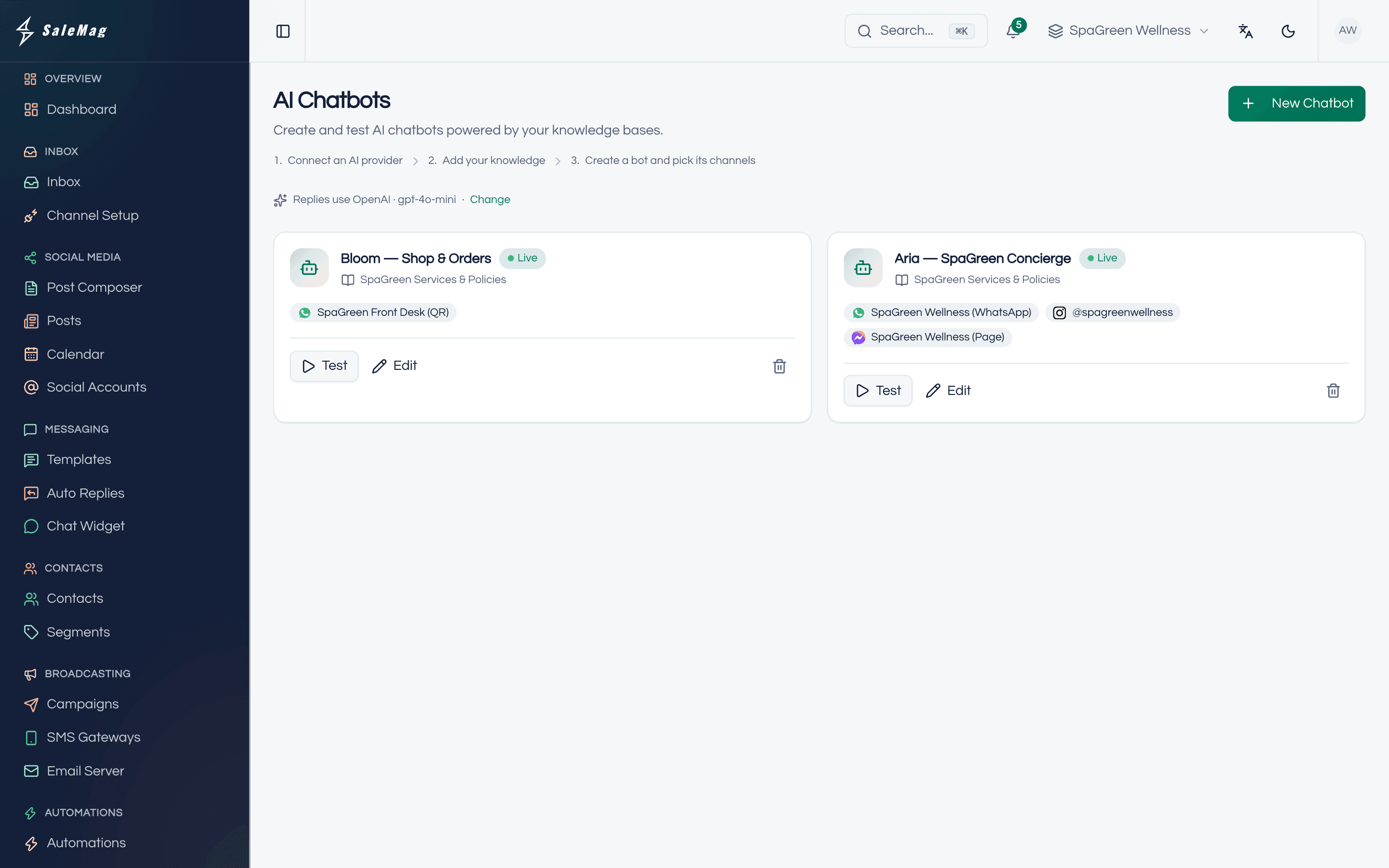
An AI agent for WhatsApp and Messenger is software that reads each customer message, looks up the answer in the business's own content, and replies in the chat, handing hard cases to a person. Many people still call it an AI chatbot. SaleMag's AI agent does this on the channels your customers already use:
- WhatsApp, through the official WhatsApp Business API or a QR-linked number
- Facebook Messenger, see Messenger AI agent
- Instagram direct messages, see Instagram DM automation
- Telegram, see Telegram bot, and WeChat
The agent remembers the last ten messages of the chat, so a follow-up like "ar blue ta?" makes sense to it. It also sees the customer's last three orders in SaleMag, so it can answer "where is my order?" with the status and tracking link your team or store recorded.
Which AI agent do you need?
SaleMag has one AI agent that you set up for the job you need. Each page below explains one use in detail:
| Your problem | What the agent does | Read more |
|---|---|---|
| Buyers ask price and stock all day | Quotes listed prices and stock, suggests products, sends product photos | AI sales agent |
| Orders get lost in chat | Builds the cart, collects name, phone and address, creates a COD order | AI order taking |
| Policy and delivery questions repeat | Answers from your FAQs, files and web pages | AI customer support agent |
| "Where is my order?" messages | Reads the customer's last three orders and the tracking link | AI order tracking agent |
| Enquiries need sorting before sales calls | A flow asks your questions and routes hot leads; an AI step answers free text | AI lead qualification |
Where does the SaleMag AI agent get its answers?
SaleMag's AI agent answers from a knowledge base you build, using retrieval-augmented generation: it looks up your content first, then answers from what it found. You can add these sources:
| Source | What you add |
|---|---|
| Files | PDF, Word, Excel, CSV, TXT, Markdown or JSON, up to 20 MB each |
| Web page | One URL, fetched and indexed |
| Sitemap | Up to 200 pages from your website's sitemap |
| FAQ | Question and answer pairs you write |
| Text | Any policy or note you paste in |
| Products | Your whole catalog, manual products or one connected store; re-indexed when products change |
The agent is instructed never to invent prices, policies or links. If nothing relevant is found, it sends your fallback message or passes the chat to a person. For tips on keeping answers right, read how to stop an AI agent giving wrong prices.
Can the AI agent reply in Bangla and Banglish?
Yes. Every SaleMag AI agent is instructed to reply in the language the customer writes in. A message in Bangla gets a Bangla reply, and a message in English gets English. Write your FAQs and policies in the language your customers use, and the answers sound more natural.
When the agent takes orders, it also understands common Banglish confirmations like "thik ache" or "order koren".
Which AI models does it use, and what does it cost?
SaleMag's AI agent runs on OpenAI, Anthropic (Claude) or Google Gemini, with your own API key. The provider bills you directly for what you use. SaleMag checks the key, shows the models it can use with a recommended default, and logs tokens for each reply.
Smart (semantic) search over your documents needs an OpenAI or Gemini key, because Anthropic does not offer embeddings. Without one, the agent still works with keyword search. For a cost guide in taka, see AI agent cost in Bangladesh.
What happens when the AI agent does not know the answer?
SaleMag's AI agent passes the chat to your team through human handover when:
- it is unsure and "hand over when unsure" is on
- the customer types a handover phrase; the built-in list is English ("talk to human", "real person", "live agent" and similar)
- the customer asks for a person in their own words, while "hand over when unsure" is on
The conversation is marked for a human in the unified inbox, and your team gets a push notification. The AI stays silent until someone hands the chat back with one click. It also stays out of a chat for 15 minutes after any human reply, including replies you send from the WhatsApp Business app on your phone.
What can I set for each AI agent?
Each SaleMag AI agent has its own settings:
| Setting | What it does |
|---|---|
| Knowledge base | Which content the agent answers from |
| Tone | Professional, friendly, formal, casual or concise |
| Instructions | Your own system prompt, up to 8,192 characters |
| Context chunks | How many knowledge snippets it reads per reply (1 to 20) |
| Fallback reply | What it says when it has no answer |
| Hand over when unsure | Pass uncertain chats to your team |
| Order taking | Let it build cash-on-delivery orders in chat |
| Channels | Which WhatsApp, Messenger, Instagram, Telegram or WeChat accounts it answers |
AI agent vs keyword auto-reply: which should I use?
Use both. Keyword auto-replies give fixed answers, and the AI agent handles everything else. Keyword rules, a welcome message and an out-of-hours reply run before the AI, so a fixed answer stays fixed. Here is how SaleMag handles three messages:
| Customer message | What SaleMag does |
|---|---|
| A keyword you set, such as "offer" | Sends your fixed keyword reply; the AI does not answer |
| "Dhakar baire delivery charge koto?" | The AI answers from your delivery policy |
| "I want to talk to a person" | The AI hands over and notifies your team |
For step-by-step flows, the automation flow builder has an AI reply step. Developers can also call an agent through the REST API.
How do I test the AI agent before customers see it?
Every SaleMag AI agent has a test playground. Type a customer question and see the reply, the model, the tokens used, the knowledge sources it quoted, and whether it would hand over. Nothing goes to a real customer, and test orders are not saved.
What does the SaleMag AI agent not do?
So you can plan your team's work, here is what the agent does not do today:
- It does not read photos or voice notes. Those go to your team.
- It does not reply to comments on Facebook or Instagram posts. It answers direct messages.
- It does not add tags or fill contact fields by itself.
- It does not connect to couriers. Only Shopify fulfilments sync a tracking link.
Who is the SaleMag AI agent for?
- F-commerce sellers on Facebook and Instagram who get the same questions all day
- Shops that want answers at night and on Fridays without hiring a night shift
- Service businesses with a long FAQ, such as clinics, training centres and travel agents
How do I start with the SaleMag AI agent?
Start with your ten most common questions. Put the answers in an FAQ, add your product list, and test the agent in the playground for a day before you attach it to a live channel. Create an account to set it up, or see pricing for plan limits.
Step by step
- 1
Connect an AI provider
Paste your OpenAI, Anthropic or Gemini API key in AI settings. SaleMag checks the key and lists the models it can use.
- 2
Build a knowledge base
Add your FAQs, price list, delivery policy, product catalog, files or website sitemap, then wait for indexing to finish.
- 3
Create the AI agent
Name the agent, attach the knowledge base, pick a tone and write any extra instructions. Turn on order taking if you sell in chat.
- 4
Test, then pick channels
Ask real customer questions in the test playground, then attach the agent to your WhatsApp, Messenger, Instagram or Telegram accounts.
Frequently asked questions
Is SaleMag's AI agent the same as an AI chatbot?
Yes. The SaleMag AI agent is an AI chatbot. We call it an agent because it does more than fixed replies: it looks up your knowledge base, checks your catalog, can build a cash-on-delivery order and decides when to hand over to a person.
Which channels can the SaleMag AI agent answer on?
The SaleMag AI agent answers on WhatsApp (Meta's official Cloud API or a QR-linked number), Facebook Messenger, Instagram DMs, Telegram and WeChat. Each connected account has at most one agent, and one agent can cover many accounts.
How much does the SaleMag AI agent cost?
The SaleMag AI agent runs on your own API key from OpenAI, Anthropic (Claude) or Google Gemini, so the AI provider bills your business directly for usage. SaleMag plan prices are on the pricing page.
Can the SaleMag AI agent reply in Bangla?
Yes. The SaleMag AI agent is instructed to reply in the language the customer writes in, so a Bangla question gets a Bangla answer. Order taking also understands Banglish (romanised Bangla) such as "order koren".
Can the SaleMag AI agent make up prices or policies?
It is told not to. The SaleMag AI agent is instructed to answer only from your knowledge base and never to invent prices, policies or links. If it finds nothing relevant, it sends your fallback message or hands the chat to a person. Any AI can still make mistakes, so test it in the playground first.
Can my team take over a conversation from the AI agent?
Yes. A teammate can switch any conversation from the SaleMag AI agent to a human in the inbox, and switch it back later. While a person owns the chat, the AI does not reply.
Do I need a developer to set up the SaleMag AI agent?
No. Setting up the SaleMag AI agent means pasting an API key, adding your FAQs, files or products, and choosing channels in the dashboard. No code is needed.
Can the SaleMag AI agent understand photos or voice notes?
No. The SaleMag AI agent reads text messages. Customer photos and voice notes go to your team in the inbox.
About the author
WhatsApp & F-commerce automation, Dhaka
The Dhaka team that builds SaleMag, the AI sales inbox for WhatsApp, Messenger and Instagram used by online sellers in Bangladesh.