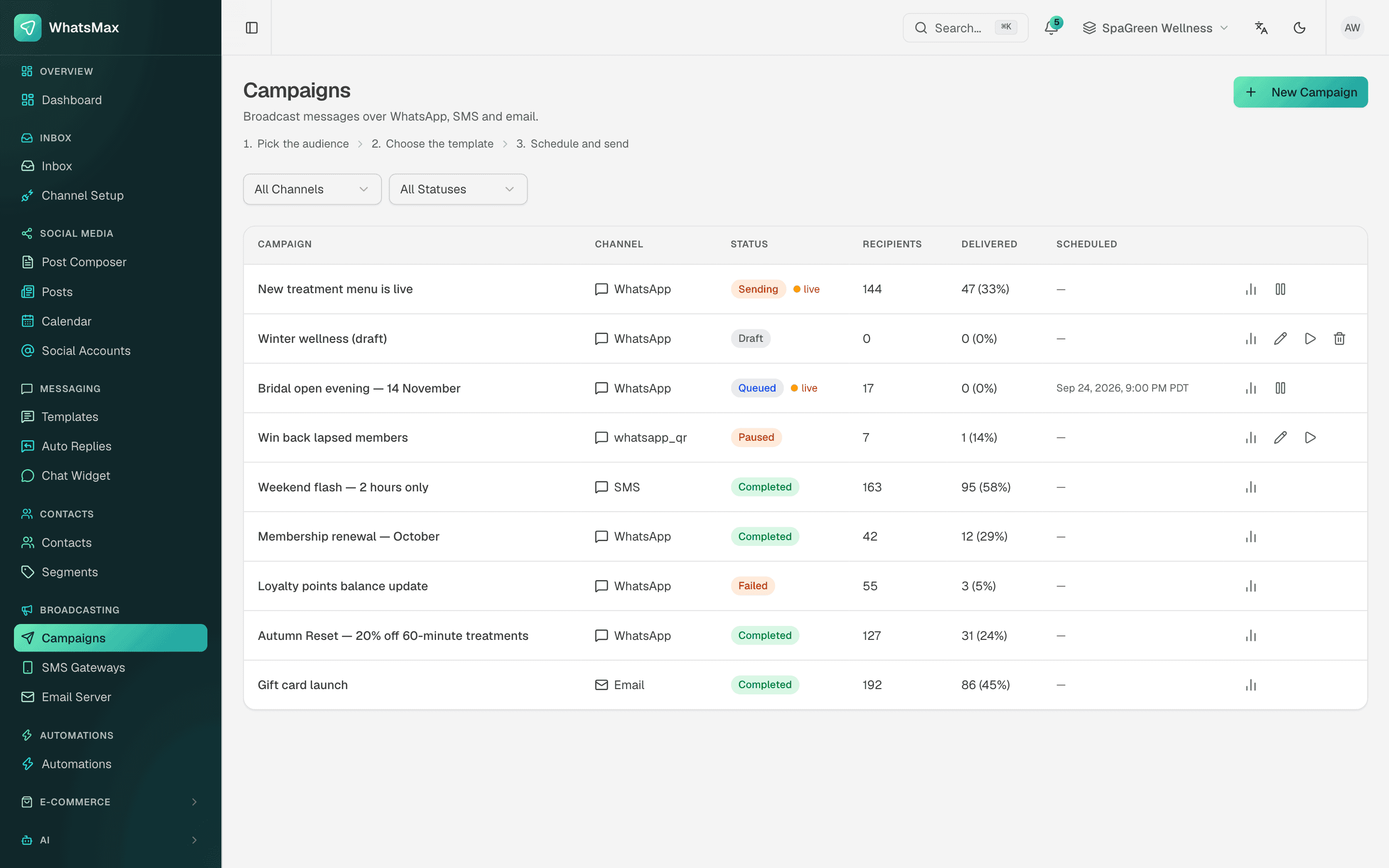
Eid sale, new collection, a best-seller back in stock: every Bangladeshi shop wants to tell past buyers. Sending one WhatsApp at a time from a phone takes hours. Unofficial "bulk WhatsApp" software gets numbers banned. And the SMS and email lists sit in yet another tool.
SaleMag puts all three on one contact list. You send through the official routes, pick who gets the message, and see who received it.
SaleMag's Broadcasting is the campaign tool that sends one message to many opted-in contacts at once, on WhatsApp, SMS or email.
Which channels can I broadcast on in SaleMag?
You can broadcast on WhatsApp, SMS and email in SaleMag. Each channel uses its own sending route and its own opt-in:
| Channel | Sends through | Message | Results | Replies |
|---|---|---|---|---|
| Meta's official WhatsApp Business API | Approved message template | Sent, delivered, read, failed | Into the unified inbox | |
| SMS | Your own SMS gateway account | Plain text with variables | Sent, delivered (where the gateway reports it), failed | Outbound only |
| Your own SMTP server | Subject and body, with an AI writer | Opens, clicks, unsubscribes | Outbound only |
Messenger, Instagram and Telegram are inbox channels in SaleMag, not broadcast channels. A WhatsApp number linked by QR code cannot send campaigns either.
For gateways, masking and sender IDs, see bulk SMS. For the block editor, AI writer and open tracking, see email campaigns. The rest of this page covers WhatsApp broadcasts.
How do I send a bulk WhatsApp message to many customers?
In SaleMag you send a bulk WhatsApp message as a broadcast campaign from a WhatsApp Business API number, using an approved template. Each person gets a separate message, not a group chat.
- Pick an approved template.
- Choose the audience: a segment, a tag, all contacts or a CSV.
- Match the variables and send yourself a test.
- Launch now or schedule it.
If you have more than one WhatsApp number, choose which one sends. New numbers start with Meta's messaging limits, which cap how many people you can reach per day.
How do WhatsApp message templates work in SaleMag?
A WhatsApp template is a message format Meta approves before you can use it to start a chat outside the 24-hour window. SaleMag lets you write, submit and track templates:
| Step | What you do in SaleMag |
|---|---|
| Choose a category | Marketing, utility or authentication |
| Write it | Header (text, image, video or document), body, footer; English, Bengali or another language |
| Add buttons | Quick reply, link or phone, up to 10 |
| Add variables | Slots filled per contact, such as first name |
| Submit | One click; Meta's approval or rejection arrives automatically |
| Fix a rejection | The reason is stored, so you can edit and resubmit |
Only templates with approved status can launch a campaign.
Who receives a SaleMag broadcast?
A SaleMag broadcast goes only to contacts in your chosen audience who opted in to that channel. Pick one source:
- a saved segment from your CRM
- a tag, such as "Repeat Buyer"
- all contacts
- an uploaded CSV
Preview the audience before you send. A WhatsApp or SMS broadcast skips contacts with no phone number or no opt-in for that channel. An email campaign skips contacts with no email address or no email opt-in. This protects your WhatsApp quality rating and respects customers who said no.
How does SaleMag send a broadcast to thousands of contacts?
SaleMag sends a broadcast in paced batches and fills each message with the recipient's own details:
- Personalisation: variables come from contact fields like
{{contact.first_name}}or any custom field. - Media headers: images and videos are uploaded to WhatsApp once and reused for the whole send.
- Pacing: recipients go out in batches of 1,000, about ten messages per second, not all at once.
- Scheduling: set a date, time and timezone, or send now.
- Controls: send a test, pause, resume, cancel or duplicate a campaign.
How do I track broadcast results?
Each SaleMag campaign shows queued, sent, delivered, read and failed counts, updated from WhatsApp's delivery receipts. Failed recipients show the reason, and you can retry them once you fix the problem. Export the recipient list to CSV, filtered by status. When a campaign finishes, you get an in-app and email notice with sent and failed counts.
Replies have no separate counter. They arrive in the inbox, where your team or AI agent answers them.
Is bulk WhatsApp software safe to use?
No. Unofficial bulk WhatsApp senders run on a normal number, and WhatsApp can ban that number. Read why unofficial bulk senders get banned. SaleMag sends broadcasts only through the official API, so the number you use for broadcasts is the same official number customers chat with.
How much does a broadcast cost?
A broadcast has two costs: the channel's charge and your SaleMag plan.
- WhatsApp: Meta charges per template message, by category and country, and bills your WhatsApp Business account. See how Meta's per-message pricing works.
- SMS: your gateway bills you for each SMS.
- Email: your SMTP provider's own terms apply.
For SaleMag plans, see pricing. Not sure which channel fits? Compare WhatsApp broadcast and bulk SMS.
Who is SaleMag Broadcasting for?
- Shops announcing Eid and 11.11 sales, restocks and new arrivals to past buyers
- Businesses sending order updates or reminders with utility templates
- Teams that want broadcasts and two-way WhatsApp chat on the same number
- Businesses that keep WhatsApp, SMS and email lists in one place
Ready to send your first campaign? Create an account, or see the plans.
Step by step
- 1
Connect a channel
Connect a WhatsApp Business API number, an SMS gateway or your SMTP server.
- 2
Write the message
Pick an approved WhatsApp template, or write the SMS or email, and add variables.
- 3
Choose the audience
Pick a segment, tag, all contacts or a CSV, and preview who will receive it.
- 4
Send or schedule
Send a test to yourself, then launch now or schedule a date, time and timezone.
Frequently asked questions
Is SaleMag's WhatsApp broadcast official?
Yes. SaleMag sends WhatsApp broadcasts only through Meta's official WhatsApp Cloud API, using templates Meta has approved. Numbers linked by QR code cannot send broadcasts.
Which channels can I broadcast on in SaleMag?
SaleMag campaigns go out on WhatsApp, SMS and email. Messenger, Instagram and Telegram are inbox channels in SaleMag, not broadcast channels.
Can I send bulk SMS from SaleMag?
Yes. SaleMag sends SMS campaigns through your own gateway account, such as a Bangladeshi provider or Twilio, to contacts with SMS opt-in. See bulk SMS for the provider list.
Can I send a WhatsApp broadcast in Bangla?
Yes. The SaleMag template editor lets you set Bengali as the template language and write the text in Bangla before you submit it to Meta.
Can I personalise each broadcast message?
Yes. SaleMag fills variables from contact fields such as first name, phone, country or any custom field, so each recipient gets their own message.
Is an unofficial bulk WhatsApp sender safer than the official API?
No. Unofficial bulk WhatsApp tools put your number at risk of a ban. SaleMag sends WhatsApp broadcasts only through the official Cloud API, with approved templates and opted-in contacts.
Can customers reply to an SMS or email campaign in SaleMag?
No. SMS and email are outbound only in SaleMag. Replies to a WhatsApp broadcast do come into the unified inbox as normal conversations.
How much does a WhatsApp broadcast cost?
Meta charges per WhatsApp template message, by category and country, and bills it to your WhatsApp Business account. SMS is billed by your gateway. SaleMag plans are on the pricing page.
About the author
WhatsApp & F-commerce automation, Dhaka
The Dhaka team that builds SaleMag, the AI sales inbox for WhatsApp, Messenger and Instagram used by online sellers in Bangladesh.